Building SpaceView with Claude Code
I built a 1,200-line Rust app in a day using Claude Code as my pair programmer. Here's what the workflow actually looked like.
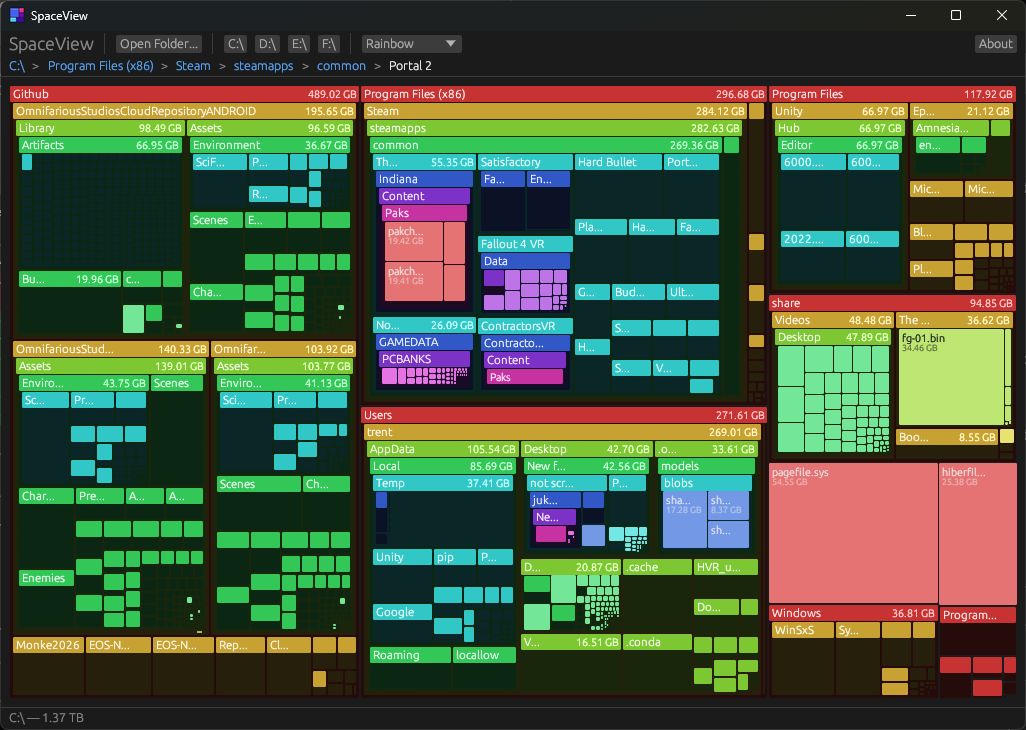
I built SpaceView in about a day. A 1,200-line Rust + egui disk space visualizer with squarified treemaps, a smooth camera, lazy LOD, color themes, and a 3.6 MB binary. The whole thing was pair-programmed with Claude Code.
This post isn’t about SpaceView’s architecture (that’s the other post). This is about the workflow. What does it actually look like to build a real app with an AI pair programmer?
The Setup
Claude Code runs in your terminal. It can read files, write files, run commands, search your codebase. It keeps a CLAUDE.md file in the repo root that acts as persistent project context. Every time it starts a conversation, it reads that file and knows the architecture, the conventions, and the current state.
I also have a MEMORY.md that persists across conversations. It remembers build commands, known issues, user preferences. When I pick up the project tomorrow, it already knows that cargo isn’t in my PATH, that I hate emdashes, and that the version lives in Cargo.toml.
How It Went
The project started with a clear goal: clone SpaceMonger. I had the original source code as reference. I described the architecture I wanted: squarified treemaps, screen-space rendering, a bounded camera, lazy level-of-detail. Claude wrote the initial scaffolding.
From there it was iterative. I’d describe what I wanted, Claude would write it, I’d run it and see what happened. The feedback loop was fast. Build, run, see the problem, describe it, get a fix.
Some examples of what that looked like:
“The headers disappear when I zoom in.” Claude identified that the world-space layout was computing header sizes proportionally. It suggested the screen-space rendering approach (which matched what SpaceMonger does). We rewrote the renderer to compute child layouts in screen pixels at each level. Fixed in one pass.
“Double-clicking a tiny folder zooms to infinity and everything goes blank.” Claude traced the problem to unbounded zoom. It added zoom clamping (1x to 5000x) and center clamping so the viewport can’t leave the treemap bounds. Then it added the clamping after every camera mutation to catch edge cases. That became the v0.5.1 release.
“I want an About dialog with the app icon and my face.” Claude wired up texture loading via the image crate, lazy-loaded on first dialog open, with proper sizing. It also generated a Python script to convert the SVG icon to PNG and ICO, and wired up winresource to embed the icon in the .exe.
“Remove all the emdashes from every public-facing file.” Claude searched three files across two repos, found every instance, replaced them all with periods/commas/colons matching my writing style, verified zero remained, committed and pushed both repos. Five minutes.
What Works Well
It remembers your project. CLAUDE.md and MEMORY.md mean you don’t start from zero every conversation. It knows the file structure, the design patterns, the build commands, and your preferences. This is a huge deal. Most AI coding tools make you re-explain context constantly.
It runs the build. Claude doesn’t just write code and hope. It compiles, reads the errors, fixes them, compiles again. When I asked for a release build at the end, it ran cargo build --release, confirmed only the known pre-existing warning appeared, and reported clean.
Multi-file edits are fast. The polish pass at the end touched README.md, index.html, and a blog post across two repos. Claude read all three in parallel, made all edits, verified with grep, committed and pushed both repos. That kind of cross-file, cross-repo coordination is tedious by hand.
It’s good at plumbing. Wiring up env!("CARGO_PKG_VERSION") to replace a hardcoded version string. Embedding icons via build scripts. Setting up OpenGraph meta tags. The boring connective tissue that takes 20 minutes to look up and 2 minutes to write. Claude does this instantly.
What Needs Attention
You still need to know what you want. Claude is fast at implementing, but the design decisions are yours. I knew I wanted screen-space rendering because I’d read the SpaceMonger source. I knew I wanted a bounded camera because I’d experienced the zoom overflow bug. The AI executes your vision. It doesn’t replace having one.
Review the code. Claude writes clean, working code, but you should understand what it wrote. I read every file. I caught a few things I wanted structured differently. The AI is a collaborator, not an autopilot.
Manage the context. CLAUDE.md gets stale if you don’t update it. I make Claude update it at every resting point. This is a habit you need to build. The quality of future conversations depends on the quality of your project memory.
The Numbers
| Total source | ~1,200 lines of Rust |
| Source files | 6 |
| Binary size | 3.6 MB |
| Versions shipped | v0.5.1, v0.5.2 |
| Repos touched | 2 (app + blog) |
| Public artifacts | GitHub release, landing page, blog post |
All in roughly a day.
The Takeaway
Claude Code isn’t magic. It’s a very fast pair programmer that never gets tired of boilerplate, remembers what you told it, and can hold your entire codebase in its head. The bottleneck shifts from typing to thinking. You spend more time deciding what to build and less time figuring out how to wire it up.
For a project like this, where the architecture is clear and the scope is focused, it’s extremely effective. I’d estimate it cut the development time by 3-4x. Not because the code is trivial, but because the iteration speed is so much faster.
The source is on GitHub. The app is on tront.xyz/SpaceView. MIT licensed.