Stop Doing Lerp(a, b, dt * speed)
Your lerp is framerate-dependent. Here's how to fix it with FRIM lerp.
I see this all the time in Unity projects:
1
transform.position = Vector3.Lerp(transform.position, target, Time.deltaTime * 5f);
It looks smooth on your machine, and then someone with a 144hz monitor or a potato laptop gets a completely different feel. Because it’s framerate-dependent.
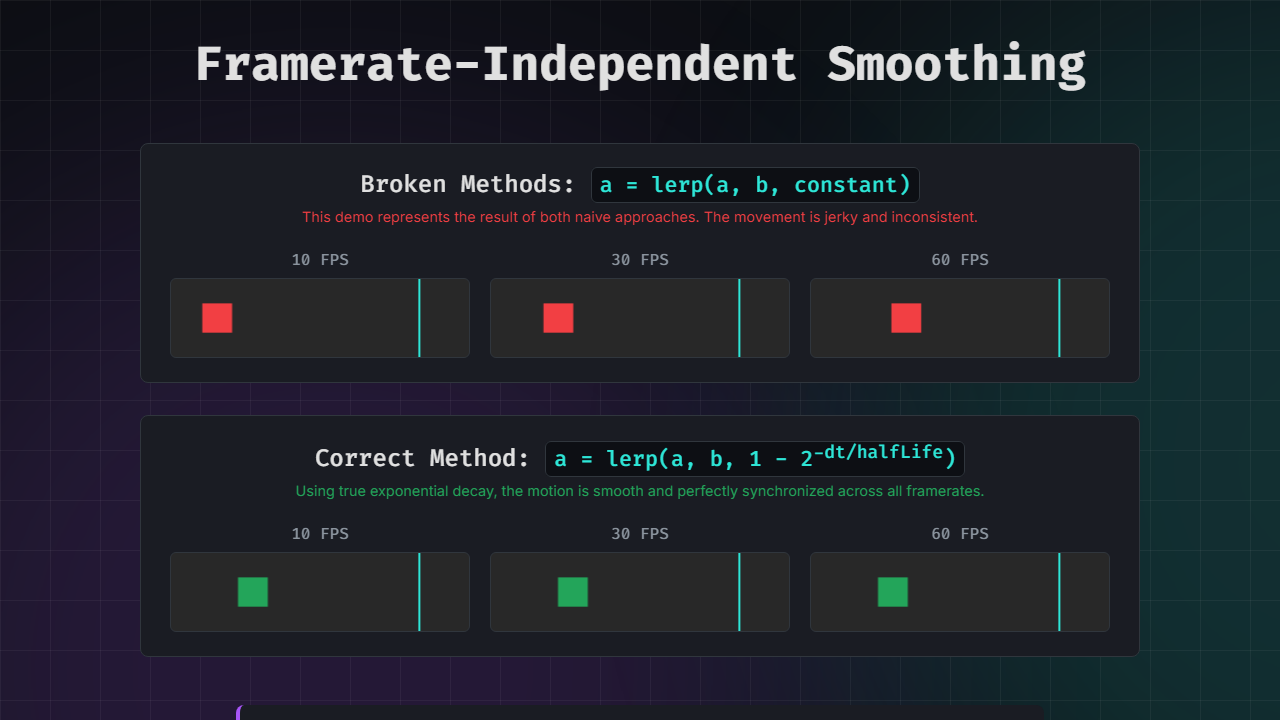
Interactive Demo - watch the 10/30/60 FPS canvases side by side. the broken version moves at different speeds. the fixed version is perfectly synced.
Why It Breaks
There are two common mistakes:
Mistake 1: Using a constant t value like lerp(a, b, 0.05). This gets applied every frame, so higher framerates apply it more often and move faster.
Mistake 2: Multiplying by deltaTime like lerp(a, b, dt * 5). This seems right but it’s not mathematically sound. Worse; if dt * 5 ever exceeds 1.0 during a lag spike, you overshoot the target and get jitter.
The fix is exponential decay. Instead of a linear approximation, you calculate the lerp factor so that the same fraction of distance is covered over the same real-world time, regardless of framerate. This is called FRIM lerp (Framerate-Independent Motion).
The Three Solutions
Here are three equivalent ways to do it, each parameterized differently. Pick whichever makes the most sense for your use case.
Half-Life (Freya Holmer’s Approach)
The most intuitive version. You specify “how many seconds to get halfway to the target.” Smaller = faster.
1
2
3
4
5
6
7
public static float LerpFrimHalfLife(this float source, float target, float halfLife, float deltaTime)
{
    return Mathf.Lerp(source, target, 1f - Mathf.Pow(2f, -deltaTime / halfLife));
}

// usage:
currentValue = currentValue.LerpFrimHalfLife(targetValue, 0.2f, Time.deltaTime);
Smoothing Factor (Ashley / Construct)
A value from 0-1 representing how much distance remains after one second. 0.1 means 10% remains (90% covered) after one second.
1
2
3
4
5
6
7
public static float LerpFrim(this float source, float target, float smoothing, float deltaTime)
{
    return Mathf.Lerp(source, target, 1f - Mathf.Pow(smoothing, deltaTime));
}

// usage:
currentValue = currentValue.LerpFrim(targetValue, 0.1f, Time.deltaTime);
Decay Constant (Rory Driscoll)
Uses a lambda value; higher = faster. Common in physics/engineering contexts.
1
2
3
4
5
6
7
public static float LerpFrimLambda(this float source, float target, float lambda, float deltaTime)
{
    return Mathf.Lerp(source, target, 1f - Mathf.Exp(-lambda * deltaTime));
}

// usage:
currentValue = currentValue.LerpFrimLambda(targetValue, 5f, Time.deltaTime);
Which One to Use
Half-life is my recommendation for most gamedev use cases. “Get halfway there in 0.2 seconds” is easy to reason about and easy for designers to tune. The smoothing factor and lambda versions are mathematically equivalent; just parameterized differently.
All three work on Vector3 too; the SmoothingExtensions.cs file on the demo page has both float and Vector3 versions ready to drop in.
Credits
This page pulls together work from three people who’ve explained this really well:
- Rory Driscoll - The exponential decay breakdown
- Ashley (Construct) - Mathematical proof of why approximations fail
- Freya Holmer - The half-life parameterization
hope you dont do
lerp(a,b,dt*5);!!!