lofigen: Procedural Lo-fi Hip-Hop in Your Browser
An algorithmic lo-fi hip-hop generator built with pure Web Audio synthesis. Inspired by lofigenerator.com, built for CraftMine, now its own thing. No samples, just math.
I’m a fan of lofigenerator.com — it’s a neat procedural lo-fi music tool that I’ve had running in the background more times than I can count. When my nephews were visiting and we were building CraftMine (a Minecraft clone I vibe-coded for them), they wanted background music. “Like those YouTube lo-fi streams.” Licensing music is annoying, and shipping audio files bloats everything, so I figured: what if the game just generated its own lo-fi hip-hop? Inspired by lofigenerator.com, I started building a procedural music system from scratch.
The plan was to make something minimal and port it into CraftMine. What actually happened is the standalone version got way more features than the game needed, and now it’s its own thing. It’s a single HTML file — 2365 lines, zero dependencies — that generates infinite unique lo-fi tracks from any seed you type in. The version running inside CraftMine is a stripped-down fork of this.
Pure Synthesis, Zero Samples
Everything you hear comes from Web Audio API oscillators, noise buffers, and filters. No audio files anywhere. The Rhodes piano sound is additive synthesis — stacked sine waves with frequency-dependent decay. Bass is a sub oscillator shaped by a low-pass filter. Drums are white noise bursts for hats, shaped noise for snares, and a sine oscillator with a pitch envelope for kicks. Pads are detuned saw waves with slow LFOs. It’s all fake, and it sounds surprisingly real.
Seeded Generation
lofigen uses a Mulberry32 PRNG seeded from whatever you type in. A number, a word, your cat’s name — each seed produces the exact same track every time. This is what made it useful for CraftMine: the game passes its world seed and gets a consistent soundtrack without storing any audio data. Two people playing the same world seed hear the same music. Share a seed with a friend and they hear exactly what you hear.
What Makes It Sound Lo-fi
The raw synth output sounds clean and digital. The lo-fi character comes from a signal chain stacked on top:
- Tape saturation — a waveshaper with soft clipping that adds subtle harmonic distortion
- Tape wobble — an LFO modulating a delay line’s time parameter, giving that warped-vinyl pitch drift
- Master low-pass at 3200Hz — cuts the high-end harshness, like listening through old speakers
- High-shelf cut at 4kHz — warm rolloff on top of the LPF
- Convolution reverb — the impulse response is procedurally generated too, no IR file loaded
- Ambient soundscapes — rain, cafe, or night, each built from filtered noise with different characteristics
That stack is what turns “some oscillators playing jazz chords” into something that actually sounds like a YouTube lo-fi stream.
Arrangement
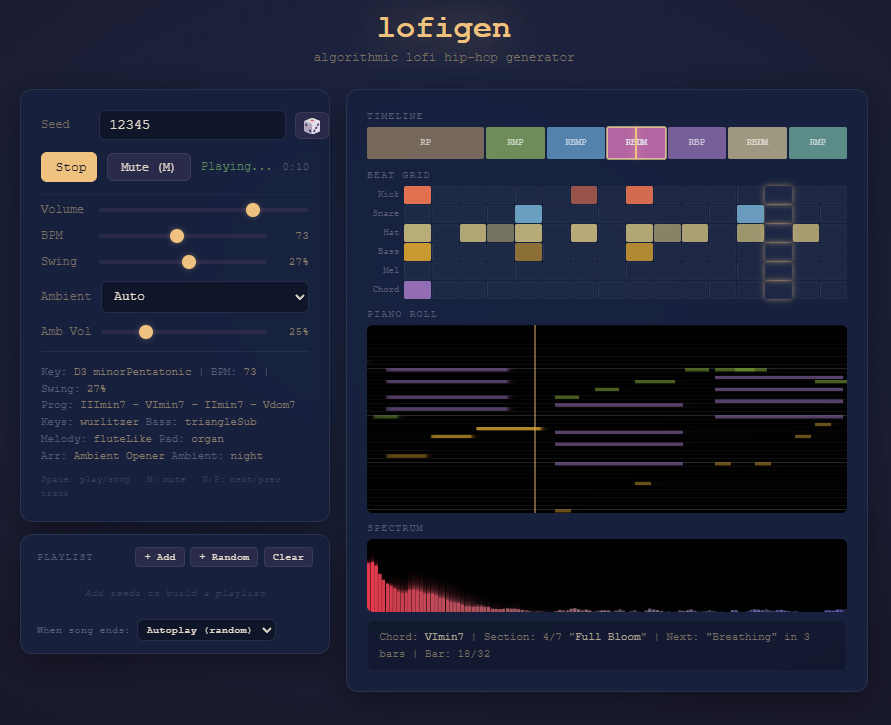
A random song would get boring fast if every instrument played the whole time. lofigen has 5 arrangement templates — Classic Build, Drums First, Ambient Opener, Melody Focus, and Stripped Back. Each template defines 7-8 sections that bring instruments in and out organically. A track might start with just rain and piano, bring in bass and drums after 30 seconds, drop to a breakdown with only pads, then build back up. It feels like a DJ set instead of a loop.
The music theory side generates chord progressions from scale patterns (minor, dorian, mixolydian) with 7th chords and jazz voicings. BPM sits in the 50-100 range with adjustable swing.
Visualizations
Four real-time displays: a piano roll showing notes as they play, a spectrum analyzer with FFT frequency data, a beat grid step-sequencer view, and a timeline with section labels and a moving playhead. The piano roll is my favorite — watching the chords and melody lines stack up while the music plays is hypnotic.
Try It
The whole thing runs from a single HTML file with no external dependencies. Playlist system (add seeds, shuffle, autoplay), keyboard shortcuts (Space for play/stop, M to mute, N/P for next/prev), and controls for volume, BPM, swing, and ambient mix.
tront.xyz/lofigen — type in a seed, hit play, and let the math make you some beats.