Notesdash: Local AI-Powered Notes Dashboard
A native Rust app that scans your drives for .txt files, analyzes them with local AI, and makes everything searchable.
The Problem
I have thousands of .txt files scattered across my drives. Quick notes, brainstorm dumps, project logs, meeting notes, random ideas at 2 AM. They live in dozens of different folders across C:\Github, C:\tront, C:\share, and everywhere in between. Windows search is slow and only matches filenames or exact strings. There’s no way to ask “show me everything I’ve written about networking” or “what was that note where I was frustrated about build times?” without manually opening files one by one.
I wanted a single dashboard that could find every text file on my machine, understand what each one is about, and let me search across all of them instantly.
What It Does
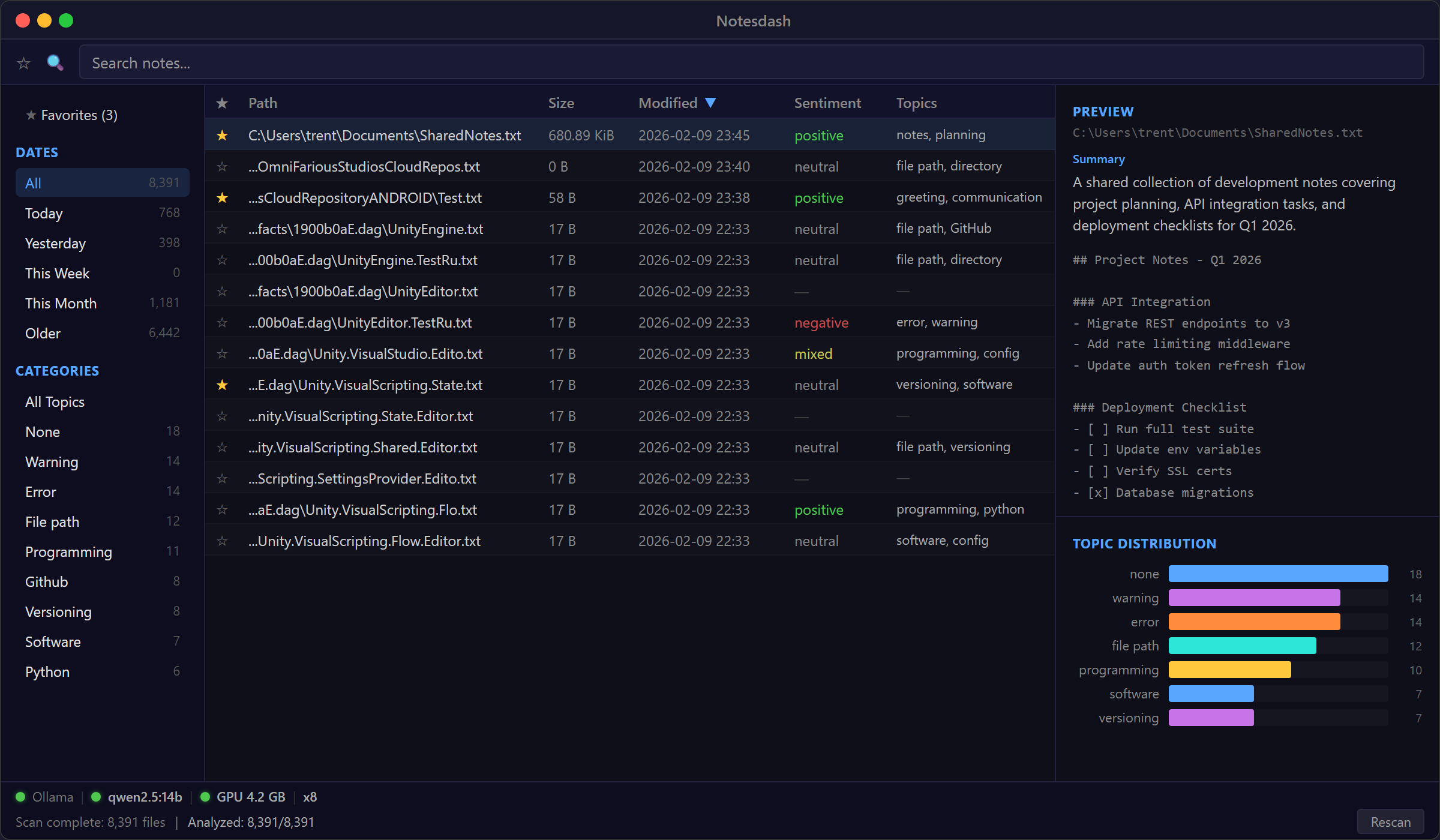
Notesdash scans your Windows drives for .txt files, feeds each one through a local Ollama LLM, and stores the results in a SQLite database with full-text search. For every file it finds, the AI extracts a sentiment rating, 1-3 topic labels, and a one-line summary. Then you can search across file paths, topics, and summaries all at once.
The GUI has a sortable table showing all discovered files with their AI-generated metadata, a sidebar for filtering by date range or topic, a preview pane for reading file contents without leaving the app, and a topic distribution chart showing what you write about most. There’s a favorites system for pinning important notes, and the whole thing handles 8,000+ files with virtual scrolling so nothing lags.
The AI Pipeline
Every text file gets sent to a local Ollama instance running qwen2.5:14b. The prompt asks for structured JSON output: sentiment (positive/negative/neutral/mixed), a sentiment score from -1.0 to 1.0, up to three topic labels, and a one-sentence summary. I use Ollama’s structured output format with a JSON schema generated from my Rust types via schemars, so the model always returns valid, parseable results.
The analysis runs with configurable concurrency (8 parallel requests by default) and truncates files over 4,000 characters to keep inference fast. Content hashing means files only get re-analyzed when they actually change. The entire pipeline runs locally. Nothing leaves your machine.
Built-in GPU diagnostics show whether Ollama is reachable, if the model is loaded, how much VRAM it’s using, and whether inference is running on GPU or CPU. Useful for debugging when analysis seems slow.
Tech Decisions
Rust + egui because I wanted a native app that starts instantly, not an Electron wrapper. egui with eframe gives me immediate-mode rendering with minimal boilerplate. The whole binary is self-contained.
SQLite + FTS5 because full-text search across paths, topics, and summaries needs to be instant. FTS5 handles prefix matching and ranking out of the box. I keep the FTS index synced via triggers so it never goes stale.
jwalk for the filesystem scan. It does a parallel directory walk across threads, which makes scanning an entire drive take seconds instead of minutes. Files get batched (500 at a time) and streamed to the database through a channel so the UI stays responsive during scans.
Local AI only because I don’t want my personal notes on someone else’s server. Ollama runs on my RTX 5070 Ti and the 14B parameter Qwen model fits comfortably in VRAM. Analysis of a full drive’s worth of files takes a few hours the first time, then incremental updates are near-instant.
Status
Notesdash is feature-complete for my own use. The repo is going private. If you have a similar problem with scattered text files and a decent GPU, the approach works well: parallel scan, local LLM analysis, SQLite FTS5, native GUI. The whole thing is about 2,000 lines of Rust.