SpaceView: A SpaceMonger Clone in Rust
I built a SpaceMonger-inspired disk space visualizer from scratch in Rust with egui. Squarified treemaps, smooth camera, and a 3.6 MB binary.
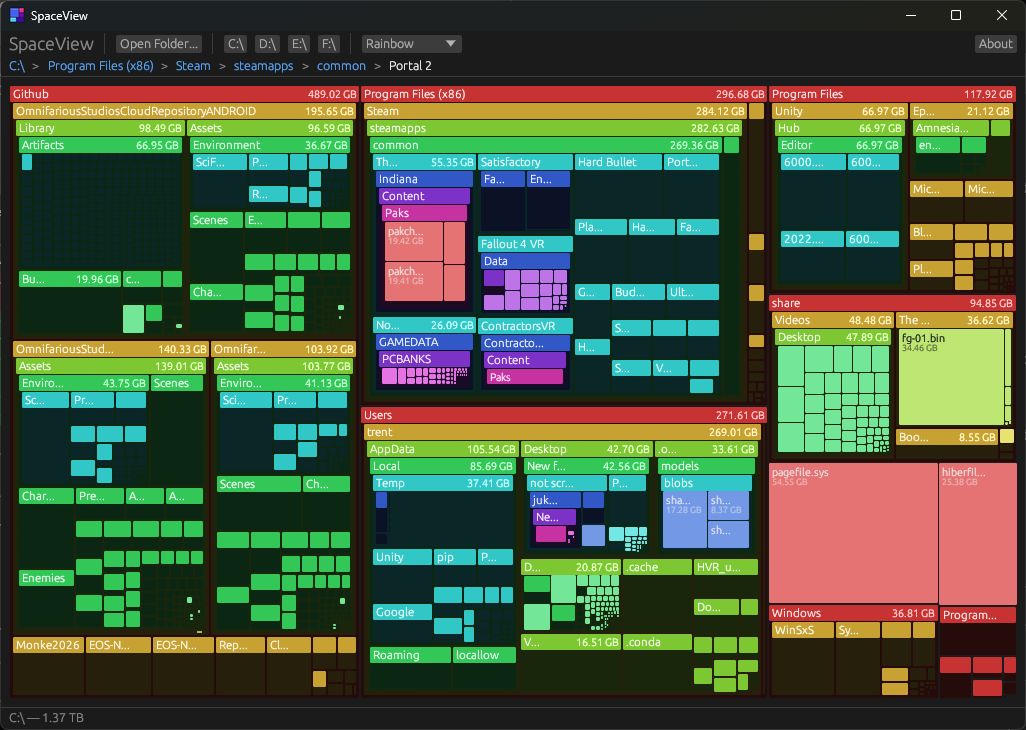
I’ve always loved SpaceMonger. You open it, point it at a drive, and immediately see where all your space went. Big rectangles = big files. No graphs, no pie charts, no loading bars that take 20 minutes. Just a treemap.
SpaceMonger was discontinued years ago. WinDirStat is slow. TreeSize is fine but corporate. So I built my own.
What It Does
SpaceView scans a drive or folder and renders a squarified treemap where every rectangle’s area is proportional to its size. Scroll to zoom, double-click to dive into a folder, right-click to zoom back out. Drag to pan. Breadcrumbs show where you are.
That’s it. It’s a disk space visualizer. It does one thing and does it well.
The Interesting Part: Screen-Space Rendering
The original SpaceMonger (I have the source code) does something clever: it lays out children in screen pixels, not world coordinates. This means headers are always exactly 16 pixels tall, padding is always 2 pixels, and borders are always 1 pixel — regardless of zoom level.
Most treemap viewers compute everything in world-space, which means when you zoom in, the proportional headers and padding either become enormous or disappear. SpaceMonger avoids this entirely.
SpaceView does the same thing. The world-space layout is approximate — it’s only used for camera decisions (what to expand, what to prune, where the camera bounds are). The actual rendering runs treemap::layout() at each recursive level in screen coordinates.
1
2
3
4
5
6
7
8
9
render_node(node, screen_rect):
  if dir with children:
    1. fill body
    2. compute content area (screen_rect minus header, padding, border)
    3. run treemap::layout() on children in screen pixels
    4. recurse into each child with its screen rect
    5. draw header ON TOP of children
  else:
    fill rect, draw clipped text
Headers are drawn after children, so they’re never obscured. All text uses clip rects to prevent spilling.
Camera System
The camera is continuous — center + zoom, no navigation stack. Zoom is clamped between 1x (can’t zoom past root) and 5000x (prevents floating point overflow at extreme magnification). The center is clamped so the viewport never leaves the treemap bounds.
The clamping was the v0.5.1 fix. Before that, you could double-click a tiny deeply-nested folder and zoom to 100,000x, which caused coordinate overflow and the entire view would go blank. The fix was straightforward: clamp the zoom, clamp the center, do it after every camera mutation.
1
2
3
4
5
fn clamp_center(&mut self, viewport: egui::Rect) {
    let wr = self.world_rect;
    clamp_point(&mut self.target_center, self.target_zoom, viewport, wr);
    clamp_point(&mut self.center, self.zoom, viewport, wr);
}
Lazy Level-of-Detail
SpaceView doesn’t expand the entire directory tree at once. It starts with just the root children, then lazily expands directories that are large enough on screen (> 80px) and prunes ones that are off-screen or tiny.
During camera animations, the expand budget increases from 8 to 32 nodes per frame so the view fills in quickly as you zoom. During idle, it drops back to 8 to save CPU.
The Numbers
| Binary size | 3.6 MB |
| Language | Rust (edition 2021) |
| UI framework | egui 0.31 |
| Source files | 6 |
| Lines of code | ~1,200 |
Tech Decisions
Why Rust? I wanted to learn it. Disk space visualization is a good fit — file I/O heavy, needs to be fast, benefits from strong typing.
Why egui? Immediate mode is perfect for this. The treemap is redrawn every frame from the layout tree. No retained widget state to manage. egui’s painter API (rect_filled, text, with_clip_rect) maps cleanly to the rendering model.
Why not async scanning? The scanner runs on a separate thread with progress counters. It’s simple, it works, and the scan progress UI updates every frame by reading atomic counters. No async runtime needed.
Install
Download spaceview.exe from the latest release. No installation needed — just run it.
Or build from source:
1
2
3
git clone https://github.com/TrentSterling/SpaceView.git
cd SpaceView
cargo build --release
v0.5.2: App Icon + About Dialog
The latest version adds a proper app icon (visible in the taskbar, title bar, and the .exe itself) and an About dialog with the icon and my face.
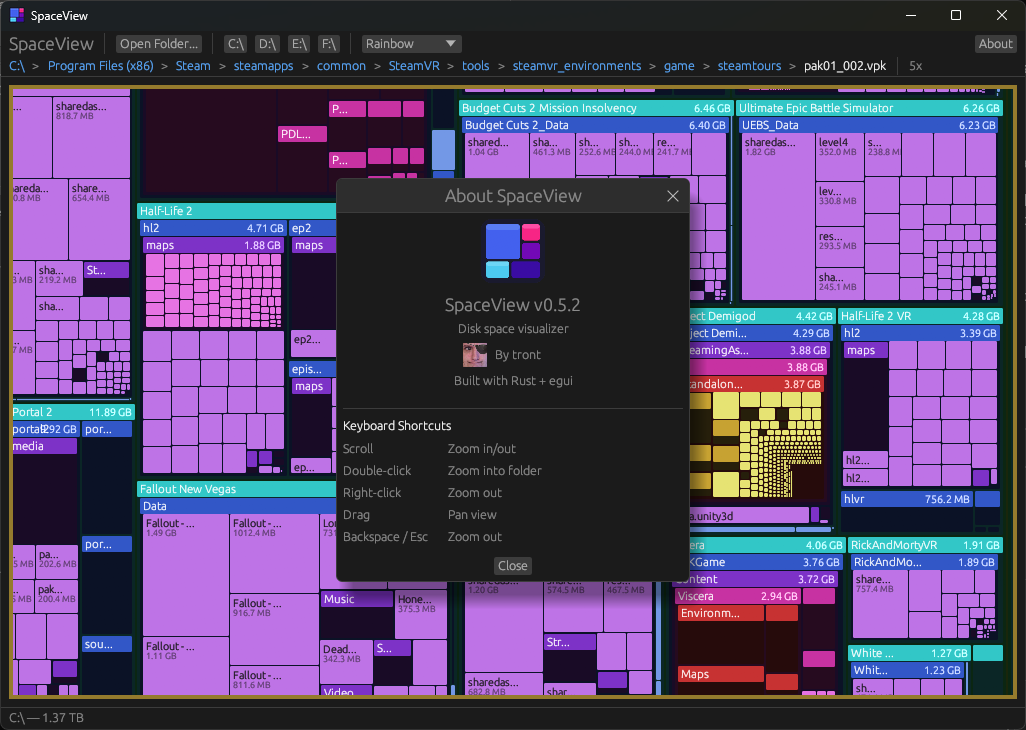
The icon is generated from a Python script that rasterizes the treemap SVG design into a 256x256 PNG and a multi-size .ico. The .ico gets embedded into the Windows .exe at build time via winresource. The About dialog lazy-loads the textures on first open using the image crate.
What’s Next
- File type coloring (by extension)
- Right-click context menu (open in explorer, delete)
- Scan caching / incremental updates
- Linux / macOS support (egui already supports it, just needs testing)
- File count display in headers
The source is on GitHub. MIT licensed.