TrontCloud - a self-hosted game backend you actually control
Self-hosted PlayFab/LootLocker alternative built in Go. Single binary, 109 endpoints, three-tier auth, Unity SDK.
The Problem With Existing Game Backends
Every game backend service works roughly the same way: you get a client SDK, it ships with an API key baked in, and your game makes calls directly to their cloud. PlayFab, LootLocker, AccelByte; they all do this.
The issue is that API key sitting in your game files. Anyone who decompiles your build (or just reads the config) can grab it and start making arbitrary API calls. Grant themselves currency. Set their leaderboard score to max int. Unlock every achievement. The “client API key” model is fundamentally broken for anything competitive or economy-driven.
The standard answer is “use server-side validation.” Run your own server that proxies calls, verifies them, then forwards to the backend. But if you’re already writing a validation server, handling auth, and managing sessions; why are you paying someone else to store your data in their proprietary format?
That’s why I built TrontCloud. If I have to do the server work anyway, I might as well own the whole stack.
What It Does
TrontCloud is a game backend written in Go with PostgreSQL. It compiles to a single binary. No Docker required for the app itself (though I use Docker for Postgres locally). The feature set covers what you’d expect from PlayFab or LootLocker:
- Players - registration, login, guest accounts, JSON data blobs
- Stats - named stats per player with atomic increment
- Leaderboards - submit scores (keeps personal best), ranked lists, player rank lookup
- Currencies - define currencies with optional caps, grant/spend with atomic locks
- Inventory - item catalog with stackable support, grant/revoke
- Store - listings with currency pricing, atomic purchases (deduct balance + grant item in one transaction)
- Achievements - definitions with progress tracking, optional auto-unlock when a stat hits a threshold
- Progressions - XP/level systems with configurable thresholds, auto level-up on XP grant
- Drop Tables - weighted random loot with optional auto-grant to inventory
- Messages - player inbox with unread count, mark read, delete
- Events - analytics tracking (single or batch up to 1000), summary aggregation with filters
- Title Data - server-side key-value config store (JSONB values)
- Friends, Groups, Trades, Bans, News, Seasons, Feature Flags, Bundles, Experiments, Triggers, Scheduled Tasks, Cloud Files - the full spread
109 endpoints total. 20 auto-migrated database tables. Everything runs from that one binary.
Three-Tier Auth
This is the part I’m most happy with. Instead of one API key that does everything, TrontCloud has three authentication levels:
PublicAuth - no API key needed. Players can browse the store, view leaderboards, check title data. This is what your game client uses before anyone logs in. Nothing sensitive is exposed because these endpoints are read-only on public data.
SessionAuth - after a player logs in (or does a guest login with a device ID), they get a session token. The game client sends this token with requests. The server knows exactly which player is making the call and only lets them touch their own data. No API key in the client build at all.
APIKeyAuth - the full-power key. This is for your game server, admin tools, or backend scripts. It can grant currency, modify stats, send messages to any player. It never leaves your server.
The practical result: your shipped game binary contains zero secrets. The client knows the server URL and a title ID; that’s it. Even if someone decompiles everything, they can only do what a logged-in player can do through their own session.
The Admin Dashboard
I didn’t want to build a separate React app for admin. The entire admin dashboard is embedded HTML served directly from the Go binary. Hit /admin in your browser and you get a full management interface with 14 tabs organized into a grouped sidebar: Core (players, stats, leaderboards), Economy (currencies, inventory, store), Progress (achievements, progressions, drops), and System (title data, messages, events, auth).
The top of the page shows 12 stat cards; uptime, total requests, player count, active sessions, and so on. Everything updates live. It’s not fancy but it works and it deploys with zero extra steps.
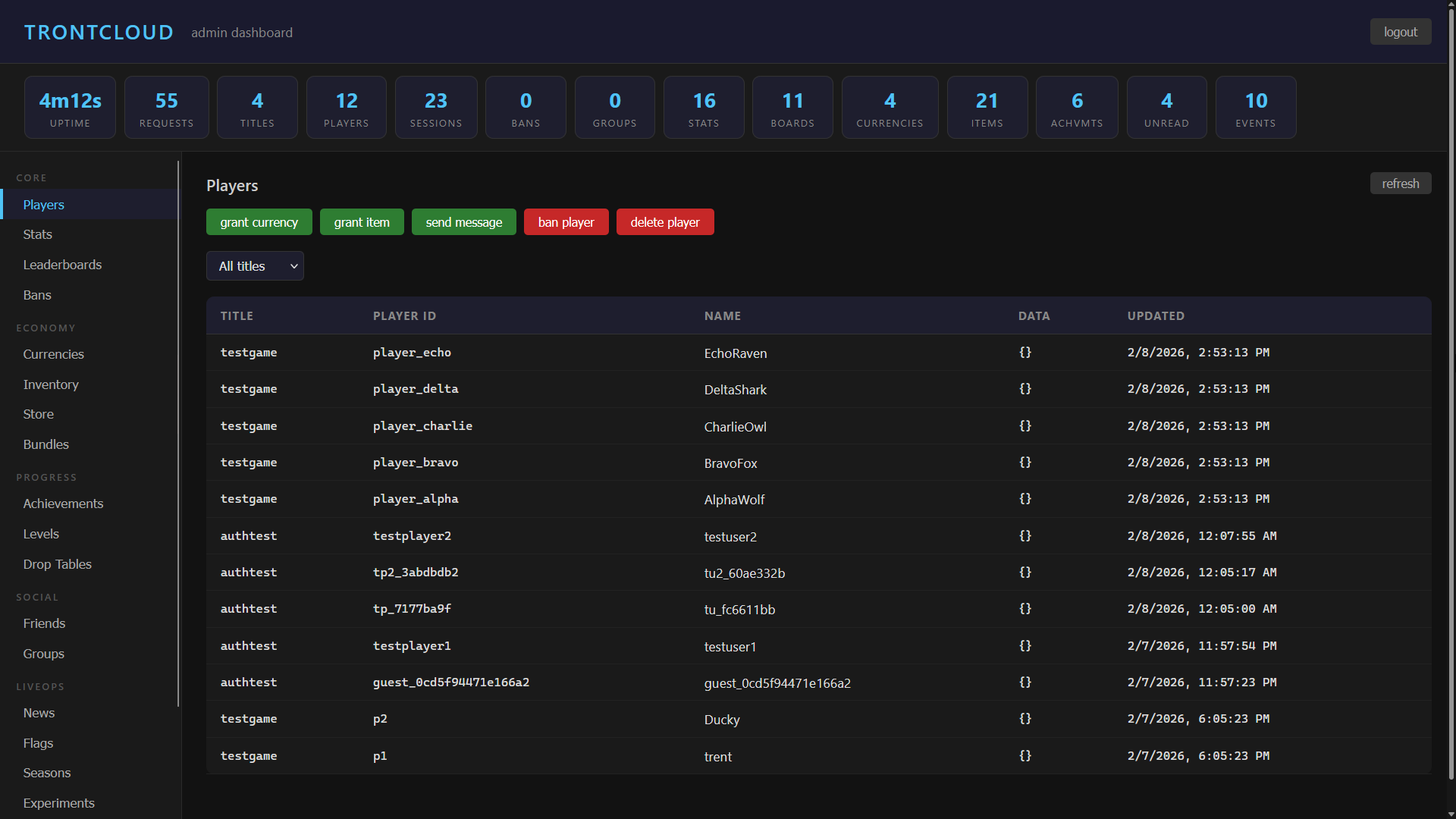 the embedded admin dashboard; 14 tabs, no separate build step
The Unity SDK
The SDK is a UPM package you install via git URL. Zero external dependencies; it uses UnityWebRequest and JsonUtility only. Works on Unity 2021.3+.
It runs in two modes:
1
2
3
4
5
6
7
8
9
10
// server mode - game server or admin tools, full API key access
TrontCloud.Init("http://your-server:8080", "your-api-key");
TrontCloud.GetStats("player123", stats => Debug.Log(stats), err => Debug.LogError(err));

// client mode - shipped game build, no API key
TrontCloud.InitClient("http://your-server:8080", "mygame");
TrontCloud.GuestLogin(SystemInfo.deviceUniqueIdentifier,
    session => Debug.Log("logged in"),
    err => Debug.LogError(err));
TrontCloud.GetStats(stats => Debug.Log(stats));  // uses session player automatically
329 public methods covering all 109 endpoints, with both callback and async/await variants. Client-mode methods automatically use the logged-in player’s ID so you don’t have to pass it around everywhere.
Security Decisions
A few things I made sure to get right from the start:
- Rate limiting - per-IP buckets; 60 requests/second for general endpoints, 5/second for auth endpoints. Buckets auto-cleanup in the background
- Passwords - bcrypt hashed, always. Session tokens generated with
crypto/rand - Atomic operations - currency spend uses
SELECT ... FOR UPDATErow locks. Store purchases wrap the entire flow (check balance, deduct, grant item) in a single database transaction. No race conditions - Body size limits - requests are capped so nobody can POST a gigabyte of JSON at you
- Server timeouts - read, write, and idle timeouts configured on the HTTP server. Slowloris attacks hit the timeout wall and get dropped
- Session expiry - tokens expire after 24 hours. A background scheduler cleans up expired sessions and inventory every 5 minutes
Nothing groundbreaking here; just the basics done correctly. Which is more than some production backends manage.
What’s Next
The immediate plan is deploying to a $5/month VPS. The whole thing is a single binary plus a Postgres instance; it should run comfortably on minimal hardware.
After that, integration with EOS-Native, my standalone multiplayer framework for Unity. TrontCloud would serve as the optional persistent backend; stats, leaderboards, and achievements that survive beyond a single play session. EOS-Native handles the real-time P2P networking, TrontCloud handles the between-session data.
I’m also considering a matchmaking backend to complement EOS-Native’s client-side matchmaking, and an anti-cheat verification layer where TrontCloud validates game state server-side.
The whole project is private for now but the Unity SDK will be installable via UPM git URL once I’m ready. If you’re building a multiplayer game and you’re tired of trusting client API keys, this is the kind of thing you end up building eventually. I just got there a bit early.